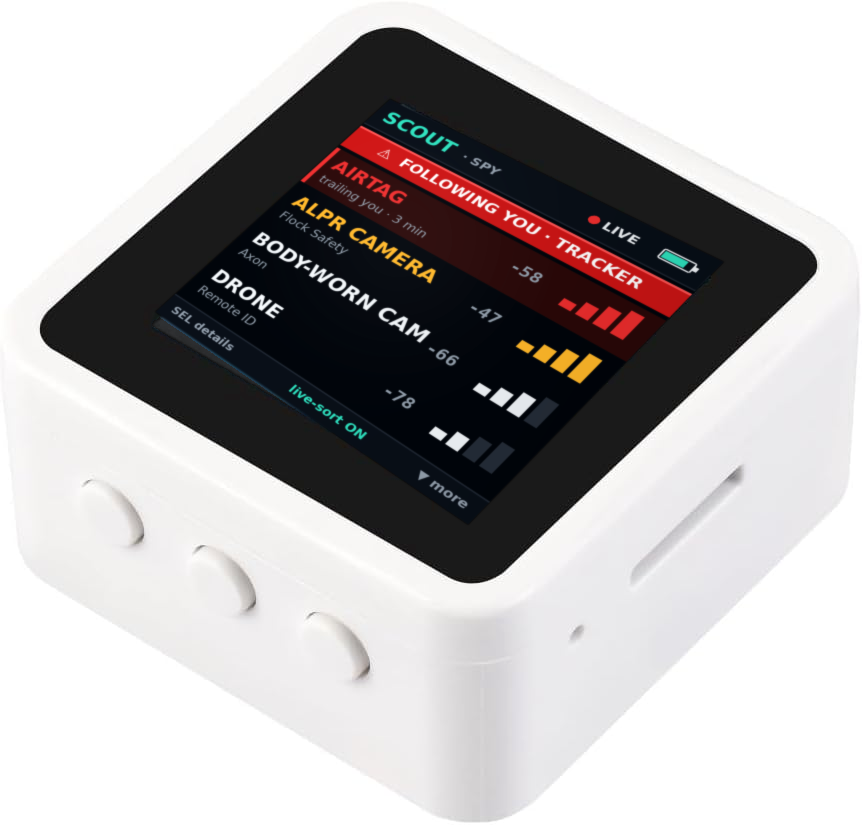
What is the MaxIntel Scout?
The MaxIntel Scout is a passive RF and OSINT handheld — part of maxintel.org — that runs free, open firmware (v1.0) on the inexpensive, off‑the‑shelf Waveshare ESP32‑S3‑Touch‑LCD‑1.54. It scans the Wi‑Fi and Bluetooth around you and flags surveillance and tracking gear by checking what it sees against a 289‑entry maker list of surveillance‑device OUIs (cameras, ALPR readers, drones, smart glasses, trackers), Wi‑Fi SSID patterns and BLE IDs — including Flock ALPR signatures. A “following me?” mode flags a device that trails you over time, and a LEO‑only filter narrows the view to police and surveillance gear. Everything is passive: it receives public broadcasts and queries public data, and never transmits, jams or actively scans. You flash it free in your browser, and what it captures feeds maxintel.org’s OSINT tools.
Updated 2026-10-27 · part of maxintel.org
What can the Scout detect?
Surveillance makers (289 OUIs)
Flags cameras, ALPR readers, drones, smart glasses and trackers by matching Wi‑Fi/BLE maker prefixes, SSID patterns and BLE IDs — including Flock ALPR signatures.
“Following me?” detector
Watches for a Bluetooth tag (AirTag, Tile, SmartTag) that stays with you across time and place, and raises an on‑screen alert.
Licence‑plate readers
Spots Flock and other ALPR by maker radio, and in connected mode maps known camera locations via DeFlock/Overpass.
Hidden cameras & IoT
Scans for camera and smart‑home makers; a separate IoT scan lists every connected device in range so nothing hides in the noise.
Spy mode + LEO filter
A Spy view with a police/surveillance‑gear‑only filter cuts through ordinary home devices to show just the gear that watches.
Sound & ultrasonic
NOISE mode measures sound level and listens for ultrasonic tracking beacons; SONAR and the IMU add presence, motion, fall and tamper sensing.
Overhead & position
Connected mode shows aircraft overhead via ADS‑B and decodes drone Remote ID, while on‑board GPS tags where you are.
Capture & export
Logs Wi‑Fi/BLE and writes PCAP + WiGLE CSV to microSD, then runs the capture through maxintel.org’s OSINT tools.
How does the Scout tell if you’re being followed?
Personal stalking almost always rides on a Bluetooth tag — an AirTag, Tile or Galaxy SmartTag slipped into a bag or a car. The Scout’s “following me?” mode keeps a short memory of the BLE devices it sees and watches for one that keeps reappearing as you move — a different place, a different time, the same tag. When a device trails you past a sensible threshold, it raises a blinking on‑screen alert and you can read its maker and ID. It never pings or disables the tag (that would mean transmitting); it just tells you it’s there. For what to do next — safely — see our Bluetooth tracker detection guide.
Is it legal? Why passive‑only matters
Receiving signals that devices broadcast publicly is passive and lawful almost everywhere, and that is all the Scout does. It never jams, deauths, spoofs or breaks into a device or network — the firmware simply has no transmit path for that. Passive‑only is both the legal line and the honest one: a radio match is a lead, not proof. A maker prefix, an SSID or a BLE ID tells you something from a given maker is nearby; it does not prove the device is a camera, that it is recording you, or who owns it. Confirm by eye before you conclude, sweep only places and things you have the right to, and never accuse a person on a radio hit alone. This is general information, not legal advice — see Is OSINT legal?
At a glance: specs
| Board | Waveshare ESP32‑S3‑Touch‑LCD‑1.54 (inexpensive, off‑the‑shelf) |
|---|---|
| MCU / memory | ESP32‑S3, dual‑core, 16 MB flash, 8 MB PSRAM |
| Display / input | 240×240 touch LCD + 3 buttons |
| Radios | Wi‑Fi 2.4 GHz + Bluetooth LE — receive / scan only |
| Sensors | Dual mics, 6‑axis IMU (QMI8658), ES8311/ES7210 audio codec |
| Storage / I/O | microSD card, native USB‑C |
| Firmware | v1.0 (2026‑10‑27) — free & open, flashes over Web Serial |
| Operation | 100% passive — no transmit, no jamming, no active scanning |
| Datasets | 289 surveillance OUIs · 176 stalkerware IOCs · 40,394 MAC vendors |
| Price | Runs on an inexpensive off‑the‑shelf board — see current pricing via the board link |
The Scout runs on the Waveshare ESP32‑S3‑Touch‑LCD‑1.54. It’s an inexpensive, widely available board — get the current price and order it here (affiliate link):

How do I set one up?
Three steps, no toolchain:
- 1. Get the board. A single Waveshare ESP32‑S3‑Touch‑LCD‑1.54 and a USB‑C data cable.
- 2. Flash it in your browser. Open Scout Studio in Chrome or Edge, click Flash MaxIntel Scout v1.0, pick the board’s port, and it writes the firmware over Web Serial in about a minute.
- 3. Scan. Walk a room, a route or a vehicle; set a free WiGLE key in Settings for BSSID history, and push captures into the Scout OSINT console.
The companion web tools
What it can’t do (honest limits)
The Scout reads radios, so it only sees things that talk over them. A camera that records to a local card and never goes online, a wired microphone, or a tracker that is switched off will not show up. A maker match can be a false positive — makers sell non‑surveillance gear too, and MAC addresses can be cloned or randomised. Treat every hit as a starting point: confirm by eye, and for analog bugs and wireless cameras that speak no protocol, add a broadband RF sweep. The counter‑surveillance field guide covers the full method and where each technique stops.
Frequently Asked Questions
Is the MaxIntel Scout legal?
Yes. The Scout only receives broadcasts that devices send publicly and queries public data - that is passive, and lawful almost everywhere. It never jams, deauths, spoofs or breaks into anything. As with any sweep, use it on places and things you have the right to, such as your own home, car, hotel room or rental.
Does the Scout transmit anything?
No. It is receive-only by design: it listens to Wi-Fi and Bluetooth and measures sound and motion, and it never transmits at a target or actively probes a network. That passive-by-design choice is the core safety and legality point of the whole device.
Can it make a tracker ring or disable it?
No, and that is deliberate. Making an AirTag or Tile ring, or disabling it, would require transmitting, which breaks the passive rule. The Scout's job is awareness: it tells you a tracker appears to be following you so you can act safely. See our Bluetooth tracker detection guide for what to do next.
What hardware do I need?
One off-the-shelf Waveshare ESP32-S3-Touch-LCD-1.54 development board. The firmware is free and open; there is nothing else to buy from us. You flash it yourself in your browser, so you need only the board and a USB-C data cable.
How do I install the firmware?
Get the board, open Scout Studio (scout-studio.html) in Chrome or Edge on a desktop, click Flash MaxIntel Scout v1.0, pick the board's serial port, and it writes the firmware in about a minute over the Web Serial API. Later updates are a single click from the same page.
What can't the Scout do?
A radio match is a lead, not proof: it cannot prove a device is a camera, that it is recording you, or who owns it, and it misses anything that is wired, analog, or switched off. Confirm any hit by eye, and pair it with a broadband RF sweep to catch analog devices that speak no protocol.
Get started
Flash it free in your browser. Grab the board, open Scout Studio, and have a working passive scanner in a minute — then feed what you find into the Scout OSINT tools.